Let your agent handle the files.
Connect Claude, ChatGPT or your own agent. It finds, shares, organizes and collects files for you, and only reaches what you allow.
https://It should work where you already are.
Add the drive once and sign in. Then ask for what you need.
- Claude
Add a custom connector in Claude's settings with the URL above, and sign in. It follows you into the Claude apps.
- ChatGPT
Add it as a connector in ChatGPT's settings, and sign in.
- Claude Code
claude mcp add --transport http freakingfast https://mcp.freakingfast.io/ mcp - Any MCP client
Give it the URL. It signs in through your browser, so there's nothing to paste.
- On your own machine
Run the MCP server yourself with an API token, and it can upload straight from your disk.
Make an API tokenclaude mcp add freakingfast -e FREAKING_FAST_API_TOKEN=<token> -- npx -y freaking-fast-mcp
Ask for the result, not the steps.
Say what you need and it picks the tools. Here are a few things to ask, and what it uses for each.
Find anything
By name, tag, folder or date. Even by a track's key, or where a photo was taken.
- Find the interview I uploaded in March
- Which of my tracks are around 128 BPM in A minor?
search_fileslist_files
Look inside a file
It can look at a photo, a frame of a video or the text of a PDF, and answer about it.
- What is on screen at 0:05 in the new cut?
- What does the contract say about payment?
read_file
Share it
A link for anything, or a page that stays up.
- Give me a link to that file
- Make this file public
get_download_urlset_file_visibility
Keep it in order
Tell it where things go and it files them.
- Tag everything from the Harbor shoot and put it in /Clients/Harbor
- Put the best ten photos from the trip in a gallery
tag_filesmove_filescreate_playlistcreate_gallery
Collect files
A link anyone can send files to, and word of what came in.
- Make a link the band can send their stems to
- Has anything come in on the Harbor request?
create_file_requestlist_file_requests
Run a review
Send a cut out for notes, read them as an edit list, and answer them.
- Send the cut to the client for notes
- Tell them the logo is fixed in v3
create_review_linkget_review_notesreply_to_note
See who's looked
Who opened what, and what happened while you were away.
- Has the client watched the cut yet?
- Which of my files got the most views this month?
get_file_viewsget_changes
Make images
On your plan's models, saved to the drive and ready to use as a cover.
- Make cover art for this track
- Make a header image for the trip gallery
generate_imageset_cover
Save from a link
The drive fetches it, so it never passes through your computer.
- Save this delivery link to my drive
- Put the dataset at this URL in /Data
import_from_url
An agent should only reach what you allow.
You choose how far it reaches when you connect it, and you can change your mind any time.
Readfiles:read
Find, open and link to your files, and see who opened them.
Organizefiles:organize
Also tag, move, add and arrange files. Nothing it does shows to anyone else, and nothing gets deleted.
Sharefiles:share
Also make files public, send them out for review, collect files from anyone, and save files from links. Nothing gets deleted.
Everythingfiles:full
Also delete files.
- One folder, or all of it
- Hold it to a folder and it can't see outside it. New files land inside.
- For as long as you say
- From a day to three months, or until you stop it.
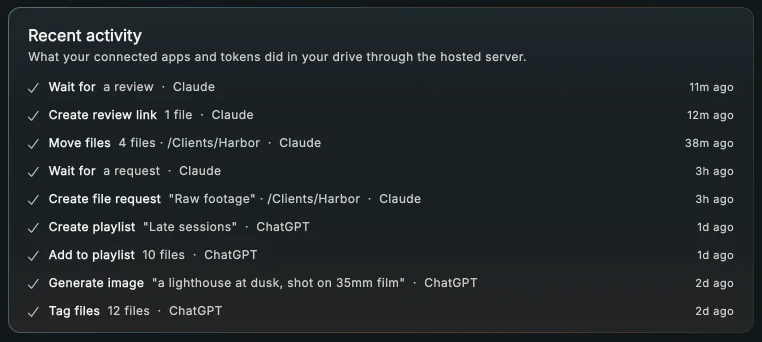
Everything it does is listed under API tokens in the app, next to the button that disconnects it. Tokens you make for your own scripts can carry the same limits.
Some jobs are worth waiting for.
Agents that speak A2A can hand the drive a whole job. It can wait days for the files or the notes, then finish.
It can wait for
- files to arrive at a request
- notes on a review
- someone to open a file
- files to land in a folder
- an image to finish
Then it picks the task back up and finishes it. Give it a webhook and you hear about every step.
- Waits up to
- 30 days
- Waiting at once
- 20per account
- Speaks
- A2A 1.0
https://Build on it.
It's all one API underneath, and all of it is written down.
- MCP serverConnect a client, or run the server with an API token.
- A2A agentSend it tasks, follow them, and get pushed updates.
- HTTP APIThe calls underneath both of them.
- Agent cardSkills, sign-in and where to send tasks.
- llms.txtThe drive in one page, for models.
- OpenAPI specEvery endpoint, with its schemas.